

Introduction
Playing Truth or Dare with pictures online makes the game more interactive and verifiable. Whether you’re challenging friends to silly poses or using photos as proof in virtual sessions, this approach brings excitement and authenticity to online play. In this guide, we’ll cover everything from basic rules to creative ideas and safety measures, including how platforms like Secret Dare handle picture verification for anonymous fun. Get ready to elevate your game, let’s dive in!
How Truth or Dare with Pictures Online Works
What is Truth or Dare with Pictures Online?
Truth or Dare with pictures online follows the traditional game rules but incorporates photos for added proof and fun. When it’s your turn, choose “Truth” to answer a question honestly or “Dare” to complete a challenge, then snap a picture as evidence. This is especially useful in virtual settings, where pictures confirm actions like posing or holding signs, building trust without meeting in person.
The Best Way to Start
Start simple: Truth questions reveal preferences, while dares involve creative shots. As play progresses, pictures can escalate the excitement, turning a basic game into a memorable adventure.
Have the Picture Reviewed
To make sure that the other person fulfilled their Dare, it can be useful to have it reviewed, this prevents cheating and keeps the game engaging. Because otherwise you could have done your own Dare beautifully, but the other person sends a fake picture.
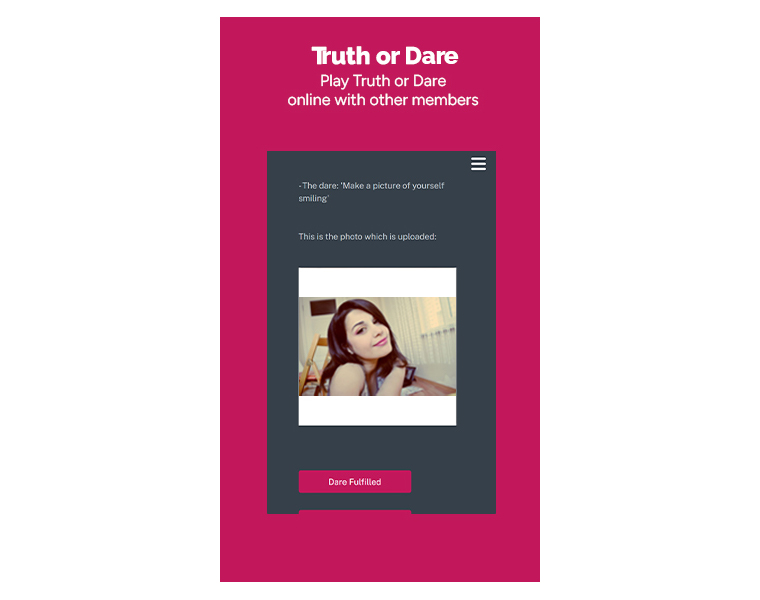
How to Verify Pictures when Playing Online
Verification ensures everyone plays fair. On Secret Dare, upload a unique picture of your dare completion. It then gets blurred and anonymously reviewed by matching members (e.g., based on gender/orientation). Only approved pictures are shared, so preventing fakes while maintaining privacy.
Step-by-Step:
- Accept a dare and snap a photo proving it (e.g., holding a sign).
- Upload, and opt for blurring if desired.
- Reviewers (anonymous) confirm it matches the dare.
- Receive the other person’s verified picture.
This builds trust, especially with strangers. For video dares, see our page on Video Chat.
Safety Tips for Sharing Pictures Online
Sharing pictures in Truth or Dare online can be thrilling, and make sure you act safely at the same time:
- Discuss boundaries upfront: Agree on what types of pictures are okay and use safe words to stop if needed.
- Stay anonymous: Avoid showing faces or identifiable backgrounds; use apps with privacy features.
- Consent is key: Only share what you’re comfortable with, and never pressure others.
- Verify platforms: Choose sites like Secret Dare that have a review process, including blurred pictures. And that have a strong privacy policy.
For adult-themed play, explore our sexy online guide with more on spicy Dares.

Rejecting or Customizing Picture Dares
Not every dare feels right, and saying no to a dare is as normal as saying yes. Rejecting is part of the fun. If a picture-based challenge is too bold, politely decline and explain (e.g., “That’s not my style, how about something milder?”). Customize by counter-daring: Suggest alternatives like “Instead, send a pic of your favorite spot.”
Tips: Start small to test comfort, and always respect “no.” This keeps the game positive and builds trust.
Benefits of Using Pictures in Truth or Dare Online
Incorporating pictures online enhances the game by:
- Building trust through visual proof.
- Ensuring safety by verifying real participation.
- Creating excitement via personalized challenges.
It’s a step up from text-only play, fostering deeper connections. Ready to try? Download the Secret Dare app and start daring!
Written by Jessica Adams, Page was Published on December 12, 2025